Jim Rossman: Enable Wi-Fi calling if your house has dead zones
Published in Science & Technology News
I was recently talking to a friend who asked me if she should change her cell phone provider. She was happy enough with the service except for a few places in her house that never seem to get more than one bar of service.
Before changing service, it’s a good idea to know which network you are using. In this country, there are only three – AT&T, Verizon and T-Mobile. All other cell phone companies use one of those three networks.
If you don’t use one of the big 3 companies, you may or may not know which network you’re using.
Visible Wireless and Total Wireless use Verizon’s towers. Cricket Wireless uses AT&T, while companies like Mint Mobile and Tello use T-Mobile’s network.
If you’re switching because of poor connectivity, it won’t do you any good to choose a new provider that uses the same towers you’re using now.
The advice I gave my friend is to try enabling Wi-Fi calling.
If you have spots in your home that are cellular dead zones, you can ask your phone to use your home’s Wi-Fi network for your incoming and outgoing phone calls.
Once Wi-Fi calling is enabled, any time your phone is connected to Wi-Fi (home, work, school), it should use that Wi-Fi network instead of cell towers.
Actually, the phone should be smart enough to figure out which connection to use (cell or Wi-Fi) by itself once Wi-Fi calling is enabled.
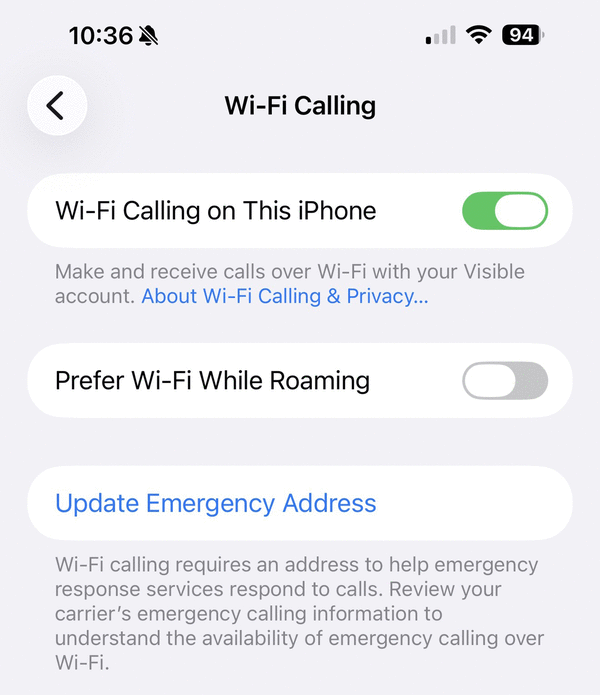
To enable Wi-Fi calling on your iPhone, go to Settings, and then Phone and scroll down to Wi-Fi Calling and turn it on. You’ll be asked to verify your emergency address, which is the location that will be shown to 911 operators if you call them using Wi-Fi calling.
Android users can open Settings and then either Network & Internet or Connections, then Mobile Network or Calls. You can also search in your settings for Wi-Fi calling.
Finally, it is possible your carrier doesn’t support Wi-Fi calling. If you don’t see the option or the button is grayed out, it might not be supported on your plan or with your specific phone. Check with your phone company to be sure.
©2025 Tribune Content Agency, LLC.






Comments